
WordPress Plugin for Tutor



This is a Tutor plugin that provides complete WordPress integration with your Open edX instance. It includes:
- Full WordPress installation and management
- Integration with the Open edX Commerce WordPress Plugin
If you need help installing the WordPress plugin, check out this installation guide.
- Tutor 20 (Teak) to 22 and Python 3.10 or newer
- MySQL database (can use the same one as Open edX)
Note
Plugin v2 supports tutor>=20,<23. For Tutor 15 to 19 (Olive to Sumac) and Python 3.9, pin the old release:
pip install "tutor-contrib-wordpress<2".
First, install the plugin by running:
pip install -U tutor-contrib-wordpress
# or with tutor
tutor plugins install wordpress
Enable the plugin and run the launch command:
tutor plugins enable wordpress
tutor dev|local|k8s launch
Alternatively, if you already have a running Open edX instance, just run the necessary jobs:
tutor dev|local|k8s do init --limit=wordpress
tutor dev|local|k8s start wordpressThe plugin automatically installs WordPress with the Open edX Commerce and Woocommerce plugins. Inside your WordPress admin panel, go to Settings -> Open edX Sync plugin, and configure:
- Open edX Domain
- Client ID
- Client Secret
To verify the connection, click on "Generate JWT Token". If the process is successful, a new token will be generated.
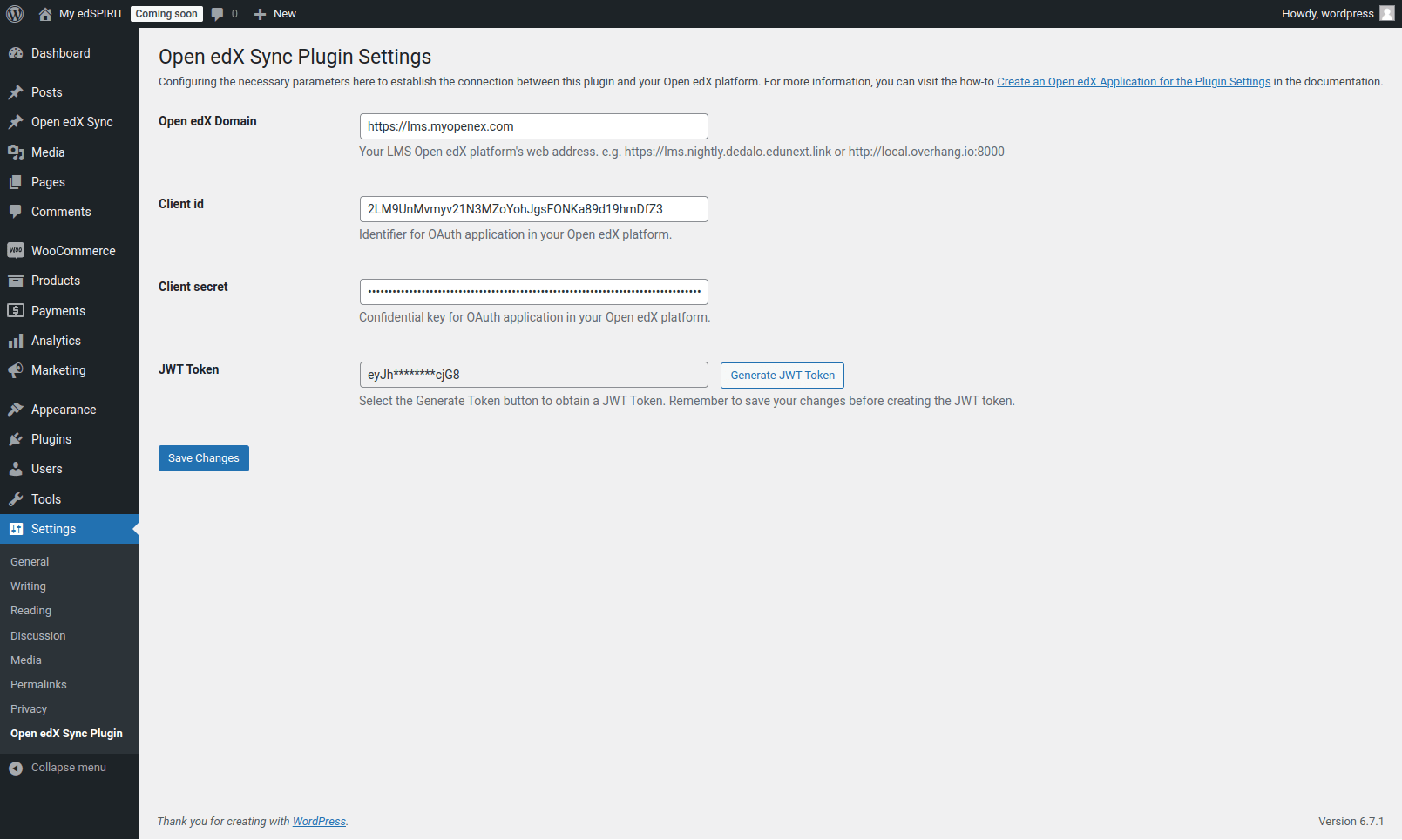
You can retrieve these configuration values by running:
tutor wordpress configThis command will output the current configurations, including the Client ID, Client Secret, Open edX Domain, and WordPress Domain. Here is an example of the output:
===============================================
    WordPress Plugin Configurations
===============================================

Client ID: vvpTamiepPwjZhr0uOQGr5PhYBzp2hQw
Client ID (dev): MlbXk1V3wB7nWPAAyLF3McyfBBMqExa4
Client Secret: MdrgbtU8Q94He3gejF6Zf5MDookoeozO

Open edX Domain: http://local.openedx.io:8000
Wordpress Domain: http://site.local.openedx.io:8080
The plugin does two jobs: it runs a WordPress container, and it creates the OAuth2 applications in Open edX that the WordPress plugin needs. If your WordPress site is hosted elsewhere (another server, a managed host), you only need the second one:
tutor config save --set WORDPRESS_RUN_LOCAL=false --set WORDPRESS_HOST=shop.example.com
tutor dev|local|k8s do init --limit=wordpress
tutor wordpress config
With WORDPRESS_RUN_LOCAL=false Tutor does not run, route to or create a database for a WordPress container.
Then, on your external site:
- Install and activate the Open edX Commerce WordPress Plugin and WooCommerce (no migration of your site is needed).
- Go to Settings -> Open edX Sync plugin and enter the values printed by
tutor wordpress config. - Make sure the site can reach your LMS over HTTPS.
To go the other way and move an existing site into Tutor, keep WORDPRESS_RUN_LOCAL=true and restore your files into
$(tutor config printroot)/data/wordpress and your database into the WORDPRESS_MYSQL_DATABASE database.
The plugin supports the following configuration variables:
WORDPRESS_VERSION: Plugin versionWORDPRESS_HOST: WordPress site hostnameWORDPRESS_RUN_LOCAL: (default: true) Run WordPress inside Tutor. Set to false to only configure Open edX for an external WordPress site.WORDPRESS_PORT: (default: 8080) Host port published in dev mode. The container itself always listens on 8080.WORDPRESS_DEBUG: (default: true) Dev mode only: enableWP_DEBUGand debug logging.WORDPRESS_CONFIG_EXTRA: (default: empty) PHP code appended towp-config.php. It is only read when WordPress first generateswp-config.php, so edit the file in the data volume for an existing install.WORDPRESS_PHP_MEMORY_LIMIT: (default: 256M) PHPmemory_limit. Requires an image rebuild.WORDPRESS_UPLOAD_MAX_FILESIZE: (default: 64M) PHPupload_max_filesizeandpost_max_size. Requires an image rebuild.WORDPRESS_EXTRA_PLUGINS: (default: []) List of plugin zip URLs to install in the image. Requires an image rebuild.WORDPRESS_K8S_RESOURCES: (default: {}) Kubernetesresources(requests/limits) for the WordPress container.WORDPRESS_DOCKER_IMAGE: Docker image for WordPressWORDPRESS_OPENEDX_PLUGIN: URL to the Open edX Commerce pluginWORDPRESS_WOOCOMMERCE_PLUGIN: (default: "https://downloads.wordpress.org/plugin/woocommerce.11.3.1.zip") The WooCommerce plugin zip file URL. You can specify a different version if needed.WORDPRESS_OFFICIAL_IMAGE: (default: "wordpress:7.1.5-php8.4") The official WordPress Docker image used as the base for building the plugin's custom image. This image includes PHP and Apache server. You can specify a different version or PHP variant if needed.
WORDPRESS_MYSQL_HOST: MySQL hostWORDPRESS_MYSQL_PORT: MySQL portWORDPRESS_MYSQL_DATABASE: Database name (default: wordpress)WORDPRESS_MYSQL_USERNAME: Database usernameWORDPRESS_MYSQL_PASSWORD: Database password (auto-generated)WORDPRESS_TABLE_PREFIX: Table prefix (default:wp_)
WORDPRESS_DATA_VOLUME_SIZE: Size of WordPress persistent volume (default: 5Gi)
WORDPRESS_OAUTH2_SECRET: OAuth2 secret key (auto-generated)WORDPRESS_OAUTH2_KEY_SSO: OAuth2 client ID (auto-generated)WORDPRESS_OAUTH2_KEY_SSO_DEV: OAuth2 development client ID (auto-generated)
We welcome all contributions! Feel free to open a Pull Request or an Issue.
This software is licensed under the terms of the AGPLv3.