See 'admin_documents' folder for general information about the project. The Microsoft Word documents can be opend in google docs, if needed. The 'COP-Partnerhip document talks about how you can contribute to this project. the 'admin_planning' folder has planning documents such as new planned features.
-
Clone this repo.
git clone https://github.com/MikeRobertsIsHappy/jacquelbot_cloud -
Open a sample folder, create a virtualenv, install dependencies, and run the sample:
-----PC based instructions ------- cd virtualenv env # for first time env\Scripts\activate.ps1 # to start the virtual environment for Windows(env\Scripts\activate.sh for others)) python.exe -m pip install --upgrade pip to upgrade Pip pip install -r requirements.txt OR pip install --no-cache-dir -r requirements.txt # for first time python main.py http://127.0.0.1:8080/
-
Visit the application at http://127.0.0.1:8080/.
Use the Google Developers Console to create a project/app id. (App id and project id are identical)
If new to this deployment process, you can watch this. Watch this https://www.youtube.com/watch?v=F7R8dEin6ZY Setup the gcloud tool, if you haven't already. Then use gcloud to deploy your app
from the cloud terminal If delpoying to team location, the application might be disbaled to reduce billing costs. If the application has been diabled, you can enable the appilcation here https://console.cloud.google.com/appengine/settings?cloudshell=false&project=the-needs-game
git clone https://github.com/MikeRobertsIsHappy/NeedsGameApp.git gcloud init # (optional if you want to change settings)
cd NeedsGameApp #to the directory with the source code
gcloud app deploy # to deploy, may take several minutes
cloud app logs tail -s default # (optional) will stream the logs to the terminal. Useful for debugging
3. Your application is now live
## Should look like this
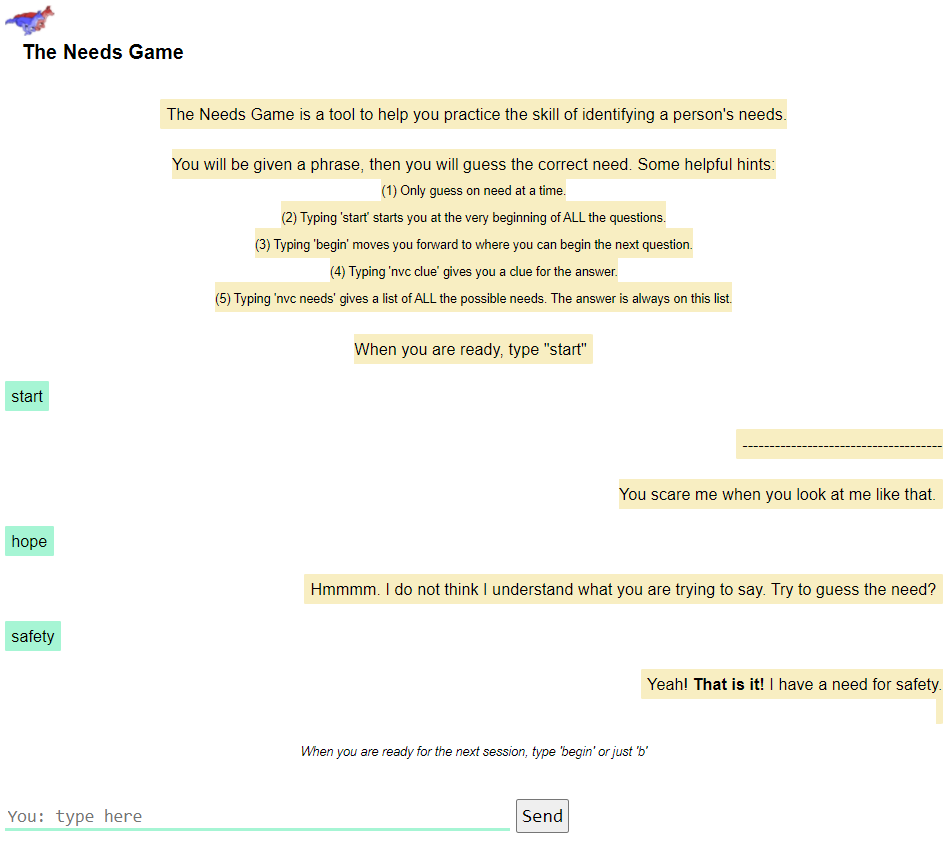
To see an example terminal text. please view the file README_gcloud.md in this repository.