random entity textures
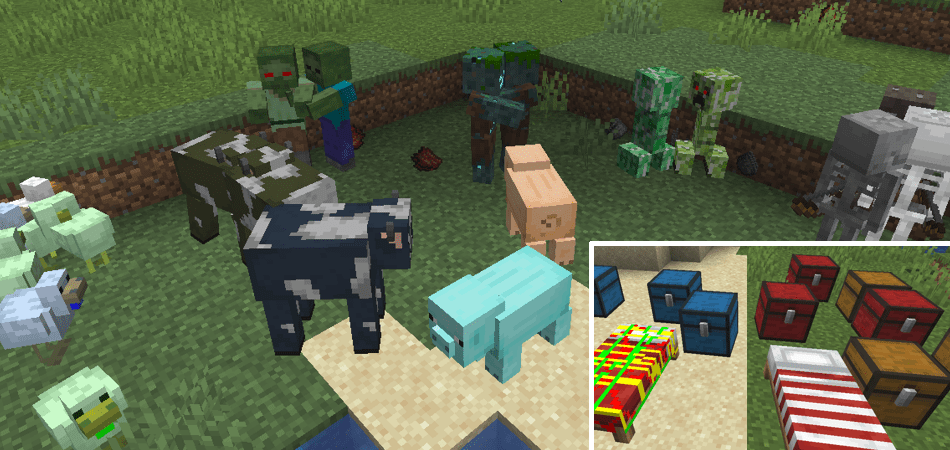
- ETF supports all OptiFine random entity texture properties such as
biome,name,heightetc. - ETF also adds extra random texture features that OptiFine does not have. Including:
- more properties such as
blocks,teams,distanceFromPlayer,creeperCharged,statusEffectand many more detailed further in etf_random_entites.properties. - the variation of modded entity textures.
- the variation of certain block entity textures, such as chests and beds.
- more properties such as
-
Random textures must be in one of the following folders of a resource pack.
ETF will check from the top directory first and will only use the last directory if none of the others are used:- The ETF directory
etf/random/entity - The OptiFine random directory
optifine/random/entity - The OptiFine legacy directory
optifine/mob - The vanilla directory
minecraft/textures/entityor wherever a modded entity's texture happens to be by default.
- The ETF directory
-
The random textures must be named after this format:
TextureName#.png, with#being any number that should start from 2. -
A
TextureName.propertiesfile can be placed alongside these random textures to determine special cases for different random textures to be selected. This properties file must support the ETF/OptiFine format and if one isn't present, the game will instead pick randomly from the available random textures present. When picked randomly, the random textures must contain numbers in sequence from2-> however many there are. If there are any gaps, then textures after the gap will be ignored -
The properties file functions exactly like OptiFine and if a specific entity does not match any of the conditions in the properties file it will default to the vanilla texture.
-
ETF seeds the random selection with the entities UUID, so the same entity will always have the same random texture.

-
ETF also adds the following texture properties beyond what OptiFine has:
teamsspeedjumpStrengthmaxHealthllamaInventoryhiddenGeneplayerCreatedscreamingGoatcreeperChargedisAngrydimensiondistanceitemslightmovingisSpawnerhourminutesecondmonthDaymonthweekDayyearDayyearlanguage- as well as expanding the regular optifine properties.
-
These and the rest of the properties added by ETF are documented with examples here
-
Certain properties in the .properties file will update the mob's texture based on the texture update speed setting. These properties are:
nameprofessionscolorsbabyhealthnbtteamscreeperChargedisAngrydimensiondistanceitemslightmovinghourminutesecondlanguage
-
All the other conditions such as
biomes&blockswill only apply the value the entity had when it first spawned. i.e. if a zombie spawns in a desert, it will have the desert texture and it will not change to the forest texture when they walk into a forest biome. Whereas a zombie with thedistanceproperty setting its variation will continuously update its texture based on the distance from the player.
-
Mobs with additional textures like
sheep&wool,horse&markings&armour,iron_golem&cracking_texturesetc. Will, when a properties file is not present, try and match whatever variant the main texture uses. For example a sheep usingsheep2.pngwill try to usewool2.pngand if that doesn't exist it'll use the default texture -
Entities with multiple textures like Wolves, Bees or Ghasts should be given the same amount of random variant textures for each texture variant, however this is not mandatory. Such entities will also try and use the base texture's properties if the properties for the other texture is not present. e.g. a wolf using the "wolf_angry.png" texture will try to find "wolf_angry.properties" and if it doesn't exist it will try to use "wolf.properties" to control randomization instead.
ETF adds a new type of property that can be placed in an entities .properties file.
These properties do not get numbered (like biomes.1) and simply affect the rendering of all variants of the entity.
Documentation and examples can be found here.

vanillaBrightnessOverride=<0-15>
- can be set as a number from 0-15
- this overrides the brightness of the mob
- it can be used to reduce the brightness of mobs like Blazes and Allays, or increase the brightness of others.

suppressParticles=<true|false>
- if set to true this will remove ambient particles from mobs (currently only Blazes and Glow Squids)

entityRenderLayerOverride="translucent|translucent_cull|end_portal|outline"
- allows you to change the rendering layer for the entity
- in vanilla most entities will not support partial transparency, the translucent options will allow that to work
- the end_portal and outline options are for fun simply because they work
- Compatibility with shaders is entirely dependent on the shader

|
|

|
|

|
|

|
|