Skip to content

Latest commit


History

6 Commits

Folders and files

NameName
Last commit message
Last commit date


Repository files navigation

Collection of Taranis LUA Telemetry Scripts

How to use:
Since each telemetry script has his own folder structre, please follow the instructions of each script.
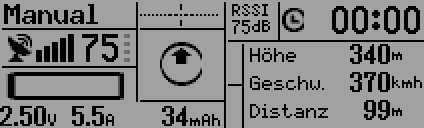
AnySense LUA Script

Functions

  • Lipo monitoring (percentage, lowest cell, current, capacity)
  • Naza Flight Mode and GPS quality
  • Internal timer which starts and stops automaticaly on arming / disarming
  • Flight- and Home-direction
  • Background tasks to e.g. set home point, even when script is not shown
  • Resets automaticaly distance and altitude when Naza sets Home Point

How To:

1. Download the telemetry screen script 2. Create a folder on the radio microSD card called SCRIPTS (if it does not already exist) 3. Put the content of the AnySense folder into /SCRIPTS/ folder 4. Rename the modelname folder to the same name as the model that will use the script 5. If needed, modify the settings section in the telem1.lua

That is it. The new telemetry screen should now automatically appear for the model.

The telem2.lua script is just an example how to split the AnySense combined value.

About

LUA Scripts for Taranis and Taranis Plus

Resources

Stars

5 stars

Watchers

3 watching

Forks

Releases

Packages

Contributors

Languages