
 oo                                                oo dP
                                                      88
 dP .d8888b. 88d888b. .d8888b. 88d8b.d8b. .d8888b. dP 88
 88 88'  `88 88'  `88 88'  `88 88'`88'`88 88'  `88 88 88
 88 88.  .88 88       88.  .88 88  88  88 88.  .88 88 88
 88 `88888P8 dP       `88888P' dP  dP  dP `88888P8 dP dP
 88~ooooooooooooooooooooooooooooooooooooooooooooooooooooo
odP    your humble and faithful electronic postman
Privacy enhanced terminal application for off-line E-mail management
Updates on: https://dyne.org/software/jaro-mail
Jaromail is an integrated suite of interoperable tools for GNU/Linux, Apple/OSX and MS/WSL to manage e-mail communication in a private and efficient way, without relying too much on on-line services, in fact encouraging users to store E-Mail locally and remove it from servers.
Rather than reinventing the wheel, Jaromail adopts a set of robust free and open source tools and integrates them automatically. It also comes with a complete usage manual.
Overview of internal components:
| executable | function |
|---|---|
| ZSH | Shell interpreter |
| Neomutt | Mail User Agent |
| mSmtp | Mail Transport (send) |
| Fetchmail | Mail Transport (receive) |
| Vim | Mail editor |
| Mblaze | Maildir manipulation |
| GnuPG | Encrypt and sign |
| Mixmaster | Anonymity |
| Notmuch | Local Search engine |
| ABook | Local Addressbook |
| Elinks | HTML rendering |
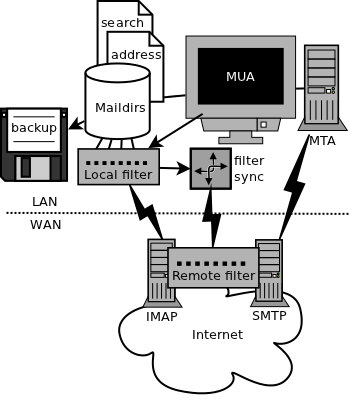
Jaromail architecture diagram:
List of core features
- Privacy by design to facilitate local storage and backup
- Helps to empty an on-line INBOX, free space and avoid bills
- Supports strong encryption and signing messages (gpg)
- Minimalistic and efficient interface with message threading
- Targets intensive usage of e-mails and mailinglists (neomutt)
- Stores E-Mails in a very reliable UNIX format (maildir)
- Integrates filtering locally as well remotely with (sieve)
- Implements graylisting to filter known and new contacts
- Can do search and backup by advanced expressions (notmuch)
- Automatically generates filter rules (sieve)
- Imports and exports VCard contacts to addressbook (abook)
- Computes and shows statistics on mail traffic
- Encrypted password storage OS independent (pass)
- Advanced analysis tools and address extraction (mblaze)
- Group contacts into secret BCC: lists of recipients
- Checks fingerprints of SSL/TLS server certificates
- Can send anonymous emails (mixmaster)
- Renders HTML with links, without images (elinks)
- May run on a remove machine connected via terminal (ssh)
- Many languages! so exotic! such UTF-8!
- Multi platform: GNU/Linux/BSD, Apple/OSX, Microsoft/WSL
- Old school, used by its author for the past 20 years
On Linux x86_64 or arm64, install the complete package from the latest release:
curl -fsSL https://dyne.github.io/JaroMail/install.sh | bashThe installer checks the published SHA-256 checksum and installs under
$HOME/.local without sudo. Install the external mail tools listed below
separately. See the installation guide for details and
custom prefixes. The one-liner is served by the documentation deployment.
Make sure you have installed the following dependencies on your operating system, they should be named in a similar way across distributions, here below the names of the packages are referring to those found in APT distros:
fetchmail msmtp neomutt notmuch pinentry-curses \
wipe mblaze vim netcat-traditional
Optional for the jaro serve local IMAP bridge: Dovecot 2.4.x, including
dovecot, doveconf and the IMAP service. Distribution packages are often
named dovecot-core and dovecot-imapd; check dovecot --version, since
Dovecot 2.3 uses an incompatible configuration format and is not supported.
Run jaro serve as the mail owner, without sudo. It prints credentials for
127.0.0.1:61443 (unencrypted, loopback only) and stops on Ctrl-C. Use
jaro -n serve to preview without changing files or starting a server.
Same-user clients can read MAIL_ROOT/.imap/passwd (mode 0600), the
username:{PLAIN}password credential file shown by Credentials: at startup.
See the serve contract
for configuration and runtime ownership.
Build tools are CMake 3.20+, Python 3.9+, a C compiler and either Ninja or Make,
plus wide-character ncurses and GNU readline development libraries
(libncurses-dev libreadline-dev on Debian/Ubuntu). The complete abook 0.6.2
source is bundled and built by CMake; no system abook is needed by an installed
Jaromail. See abook source and customization.
To compile and install Jaromail:
cmake -S . -B out/build -DCMAKE_BUILD_TYPE=Release
cmake --build out/build --parallel
cmake --install out/build
The default prefix is $HOME/.local: the command is installed as
~/.local/bin/jaro, with resources in ~/.local/share/jaromail. Ensure
~/.local/bin is in your PATH. No administrator privileges are needed.
make install uses the same default.
For a system-wide installation under /usr/local, use the explicit target:
sudo make install-system
# Or, after the CMake build above:
sudo cmake --build out/build --target install-system
Packagers can override the prefix and stage everything without root privileges:
make install-system PREFIX=/usr DESTDIR="$PWD/package-root"
# Equivalent native CMake target:
PREFIX=/usr DESTDIR="$PWD/package-root" cmake --build out/build --target install-system
This stages /usr/bin/jaro, resources and manuals beneath package-root.
See installation details for prefix overrides.
The JAROMAILDIR
environmental variable can be changed to point to where all emails
will be stored, by default it is $HOME/Mail.
Read the manual:
man jaromail
For a brief overview see the commandline help:
jaro -h
When in doubt, make sure you read the Jaromail usage manual.
Note for experienced Mutt users: keys will be familiar, but there are things to learn in the manual on how jaromail enhances the workflow.
The manual-first VitePress website is in docs/, using the pinned Dyne Vite
theme. Use Node.js 24 and Pandoc, then run:
npm ci
npm run docs:dev
# Production build for GitHub Pages:
BASE_PATH=/JaroMail/ npm run docs:build
BASE_PATH=/JaroMail/ npm run docs:check
See website development and deployment for source generation and GitHub Pages setup. Native Jaromail builds do not need Node.js.
All development happens on github.com/jaromail
We are reachable on many Dyne.org chats and channels.
Developer build/test commands:
cmake -S . -B out/build -DCMAKE_BUILD_TYPE=Release
cmake --build out/build --parallel
cmake --build out/build --target check-strict
cmake --install out/build
./extras/test/inittest.sh
CMake owns all native helper and regression-driver targets. It uses ccache
for compilation when available; set -DCMAKE_C_COMPILER_LAUNCHER= to disable it.
Use -DCMAKE_INSTALL_PREFIX=/your/prefix or cmake --install ... --prefix ...
to override the user prefix, and DESTDIR to stage a package. Existing CMake
build directories retain their configured prefix. Installed wrappers
resolve resources relative to themselves, so release archives can be relocated.
The existing make, make install, make install-system, make test-strict and platform build-script
commands remain compatibility wrappers around CMake. These wrappers honor CC,
CPPFLAGS, CFLAGS, LDFLAGS, LDLIBS, CCACHE, PREFIX and DESTDIR.
Normal builds and installs use the committed docs/jaro.1 and docs/jaromail.1
without invoking Pandoc or rewriting documentation. After editing manual sources,
maintainers run cmake --build out/build --target man (or make man) explicitly and commit both the Markdown and generated
pages. This regeneration requires Pandoc and embeds no build-time date.
make test runs the source smoke test and every extras/test/test-*.sh
regression, reporting passed, failed, and skipped scripts. Missing optional
runtime tools produce exit 77 in individual scripts. make test-strict requires
every script to run without skips and is the CI entry point. Module tests use
local fixtures and never send or fetch real mail.
Release versions start at v6.0.0. CMake resolves the latest reachable stable
SemVer tag, with VERSION as the v6 development baseline and -DJARO_VERSION=...
as the release-workflow override. Installed builds carry their assigned version
in runtime metadata; jaro --version, help and the console startup banner use
that value without requiring Git or Python on the installed machine.
See release automation and static Linux archives for the
Conventional Commits policy, both CPU architectures and installation details.
The complete abook release, including translations, manuals and upstream build
files, is retained separately under vendor/abook/upstream with per-file hashes.
Its CMake adapter is under cmake/abook; future source changes can be tested
against the bundled import/export and terminal regressions. It installs in
Jaromail's private runtime directory without replacing the system abook.
Only the minimal Pigeonhole sievec/sieve-test frontend sources, shared helper,
and required notices are included under vendor/. The test
suite verifies their pinned digests and rejects extra vendor payload. Building
the validators requires matching external Dovecot/Pigeonhole development
libraries and remains separate from Jaromail's default build.
extras/test/run-source.sh validates the checked-out tree by executing
src/jaro against a temporary local install layout. inittest.sh
validates the installed jaro command selected by PATH.
Developer test dependencies (also listed in .github/workflows/pr-tests.yml) include:
zsh, make, gcc, python3, fetchmail, msmtp, mutt or neomutt,
notmuch, pinentry-curses, abook, wipe, and mblaze (for maddr).
dovecot is optional and only needed for jaro serve live daemon checks.
Legacy/optional surfaces are documented in:
docs/optional-integrations.mddocs/maintenance-inventory.md
Current policy for this branch:
statsandpublishare retained for compatibility but treated as legacy.- default maintenance and regression checks focus on the core CLI path:
init,update,filter,search,fetch,send, and addressbook flows.
JARO_FILTER_ENGINE=legacy|native selects compilation and batch filtering.
Unset selects native; an empty or unknown value fails. Set
JARO_FILTER_ENGINE=legacy for explicit rollback with compatible legacy inputs.
jaro update, jaro sieve, jaro filter and jaro fetch propagate native
errors without fallback. The normal build/install includes both helpers and the legacy export
lock bridge; neither needs Dovecot. Custom JAROMAILDIR, JAROWORKDIR and
JAROACCOUNT paths are passed explicitly. Sieve generation never deploys rules
to a server. Indexing remains in the existing update/fetch workflows.
Native compilation needs no FilterProfile.txt: built-in defaults support typed
address/domain rules and the independently qualified legacy from/to ERE
subset. Sieve declares fileinto, mailbox for automatic folder creation, and
regex only when regex rules are present. For example,
from mute@metamute move pol.newsletters keeps partial-address matching;
save remains an alias of move, and no wildcard suffix is needed. Explicit legacy
also rejects typed/domain records rather than discarding them. Native batch
filtering retains failed messages and reports partial outcomes. Native import
accepts only the bounded Jaromail-generated Sieve grammar. Existing roots need
explicit compatible policy inputs; filtering commands do not create defaults.
Fresh jaro init under unset/explicit native installs Filters.native.txt,
with no active explicit routes and typed examples in comments; builtins remain
active. Explicit legacy initialization retains the original 14 ERE defaults.
Initialization never translates or replaces an existing policy. Shipped legacy
defaults compile without creating a profile file or rewriting their patterns.
Use jaro sieve to publish, then jaro -n filter or jaro filter --explain
to inspect the current generation without moving mail. See the
migration guide
and interface contract.
An optional FilterProfile.txt can customize mailbox mappings and namespaces or
explicitly select restrictive core-v1. Explicit
pigeonhole-2.4.5-posix-ere-v1 overrides retain their capability and qualification
validation; normal defaults use the compiler's embedded catalogue automatically.
Replacing the installed catalogue or supplying a different hash cannot grant
support. The qualified subset covers shipped
defaults and benchmark patterns; unsupported EREs retain the prior generation
and fail with a source-line diagnostic. Backend requirements and the narrow
minimal-quoting correction are documented in the interface/policy contracts.
The vendored Sieve test environment already enables regex and Maildir storage;
Maildir is a storage format, not a Sieve capability to put in require.
Jaromail is Copyright (C) 2010-2023 by the Dyne.org foundation
Designed, written and maintained by @jaromil
This source code is free software; you can redistribute it and/or modify it under the terms of the GNU Public License as published by the Free Software Foundation; either version 3 of the License, or (at your option) any later version.
This source code is distributed in the hope that it will be useful, but WITHOUT ANY WARRANTY; without even the implied warranty of MERCHANTABILITY or FITNESS FOR A PARTICULAR PURPOSE. Please refer to the GNU Public License for more details.
You should have received a copy of the GNU Public License along with this source code; if not, write to: Free Software Foundation, Inc., 675 Mass Ave, Cambridge, MA 02139, USA.