Simple 2.4GHz Spectrum Analyzer based on the nRF52832 in the PixlJs allmiibo emulator
This Firmware is currently compatible with the LCD and OLED variant you can get on Aliexpress for around 10-15€ it will make it a very simple battery powered 2400 - 2487MHz Spectrum Analyzer with a Waterfall like history show with little options.

It can also show the channels for the different protocols in that band: IEEE 802.15.4 (Zigbee,..), 802.11b/g/n WiFi and BLE. In the screens below you can see its use.

The lines represent the center frequencies, and the dotted lines the BLE advertising channels.
The chip is unfortunately incapable of filtering or even identifying the different protocols (you'd need an SDR for that), so its just a visual aid.
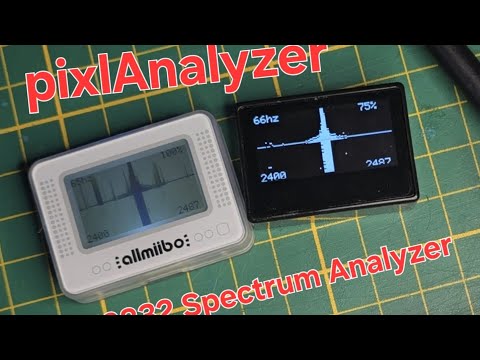
This repo is made together with this explanation video:(click on it)
Find them on Aliexpress as example here:
https://aliexpress.com/item/1005008726926205.html
The OLED version has a rather high standby current. If you want to avoid charging too often, use the LCD version.
2026-01-06: enhancements
- Button debouncing
- Settings menu (persisted between boots via flash memory) with:
- OLED / LCD contrast adjustment (some LCD screens are way too dark or too bright depending on the batch).
- LCD backlight adjustment (if you have LCD)
- Battery icon rendering in the menu and top right corner.
- Long press (5 seconds) to enter sleep mode.
- Channel visualisation: Use the scroll wheel to select waterfall view or channel identification view, to give a better idea what the signals represent. It can show three different channel types: the IEEE 802.15.4 (Zigbee,..), 802.11b/g/n WiFi and BLE channels. See Frequency range and channels below.
2025-12-06: first release
You can flash this firmware fully OTA and go back to the stock Pixl.js firmware as well.
- Navigate to the Pixl.js firmware settings and enter the "Firmware Update" menu.
- The device will reboot and show "DFU Update".
- Now use the nRFConnect App to connect to the "Pixl DFU" device showing.
- Select the correct firmware update file "PixlAnalyzerLCD.zip" or "PixlAnalyzerOLED.zip" depending on your device,
- .. and it will flash and reboot to the new Firmware.
To Go back to the Pixl.js firmware you can open the menu by pressing the middle button, then navigate to "Firmware Update" and flash the Stock firmware in the same way again.
Its made to be used with Windows right now some changes will be needed to make it Linux compatible. You need to have installed:
makegcc-arm-none-eabi- set the path to the gcc's bin folder in the
/pixlAnalyzer/firmware/sdk/components/toolchain/gcc/Makefile.posixor ...Makefile.windowsfile, depending on your OS. - example for MacOS:
GNU_INSTALL_ROOT ?= /Applications/ArmGNUToolchain/14.2.rel1/arm-none-eabi/bin/
- set the path to the gcc's bin folder in the
nrfutil- unless you have a very old version (that is, 6.x or lower), you will also need to run
nrfutil install nrf5sdk-toolsafter installation of nrfutil.
- unless you have a very old version (that is, 6.x or lower), you will also need to run
Credit goes to this repo for the codebase and pinout etc.:
https://github.com/solosky/pixl.js/
The 2.4GHz ISM band is divided into several channels used by different protocols. Here are some common channel allocations:
| Center Frequency (MHz) |
IEEE 802.15.4 channel, 5MHz wide |
802.11b/g/n WiFi channel, 22/20/40MHz wide |
BLE channel, 2MHz wide |
|---|---|---|---|
| 2400 | |||
| 2401 | |||
| 2402 | 37 | ||
| 2403 | |||
| 2404 | 0 | ||
| 2405 | 11 | ||
| 2406 | 1 | ||
| 2407 | |||
| 2408 | 2 | ||
| 2409 | |||
| 2410 | 12 | 3 | |
| 2411 | |||
| 2412 | 1 | 4 | |
| 2413 | |||
| 2414 | 5 | ||
| 2415 | 13 | ||
| 2416 | 6 | ||
| 2417 | 2 | ||
| 2418 | 7 | ||
| 2419 | |||
| 2420 | 14 | 8 | |
| 2421 | |||
| 2422 | 3 | 9 | |
| 2423 | |||
| 2424 | 10 | ||
| 2425 | 15 | ||
| 2426 | 38 | ||
| 2427 | (4) | ||
| 2428 | 11 | ||
| 2429 | |||
| 2430 | 16 | 12 | |
| 2431 | |||
| 2432 | 5 | 13 | |
| 2433 | |||
| 2434 | 14 | ||
| 2435 | 17 | ||
| 2436 | 15 | ||
| 2437 | 6 | ||
| 2438 | 16 | ||
| 2439 | |||
| 2440 | 18 | 17 | |
| 2441 | |||
| 2442 | 7 | 18 | |
| 2443 | |||
| 2444 | 19 | ||
| 2445 | 19 | ||
| 2446 | 20 | ||
| 2447 | 8 | ||
| 2448 | 21 | ||
| 2449 | |||
| 2450 | 20 | 22 | |
| 2451 | |||
| 2452 | 9 | 23 | |
| 2453 | |||
| 2454 | 24 | ||
| 2455 | 21 | ||
| 2456 | 25 | ||
| 2457 | (10) | ||
| 2458 | 26 | ||
| 2459 | |||
| 2460 | 22 | 27 | |
| 2461 | |||
| 2462 | 11 | 28 | |
| 2463 | |||
| 2464 | 29 | ||
| 2465 | 23 | ||
| 2466 | 30 | ||
| 2467 | 12 | ||
| 2468 | 31 | ||
| 2469 | |||
| 2470 | 24 | 32 | |
| 2471 | |||
| 2472 | 13 | 33 | |
| 2473 | |||
| 2474 | 34 | ||
| 2475 | 25 | ||
| 2476 | 35 | ||
| 2477 | |||
| 2478 | 36 | ||
| 2479 | |||
| 2480 | 26 | 39 | |
| 2481 | |||
| 2482 | |||
| 2483 | |||
| 2484 | 14 | ||
| 2485 | |||
| 2486 | |||
| 2487 |
