

A full-featured PDF viewer with annotation support, built for Stimulus and the Hotwire ecosystem.
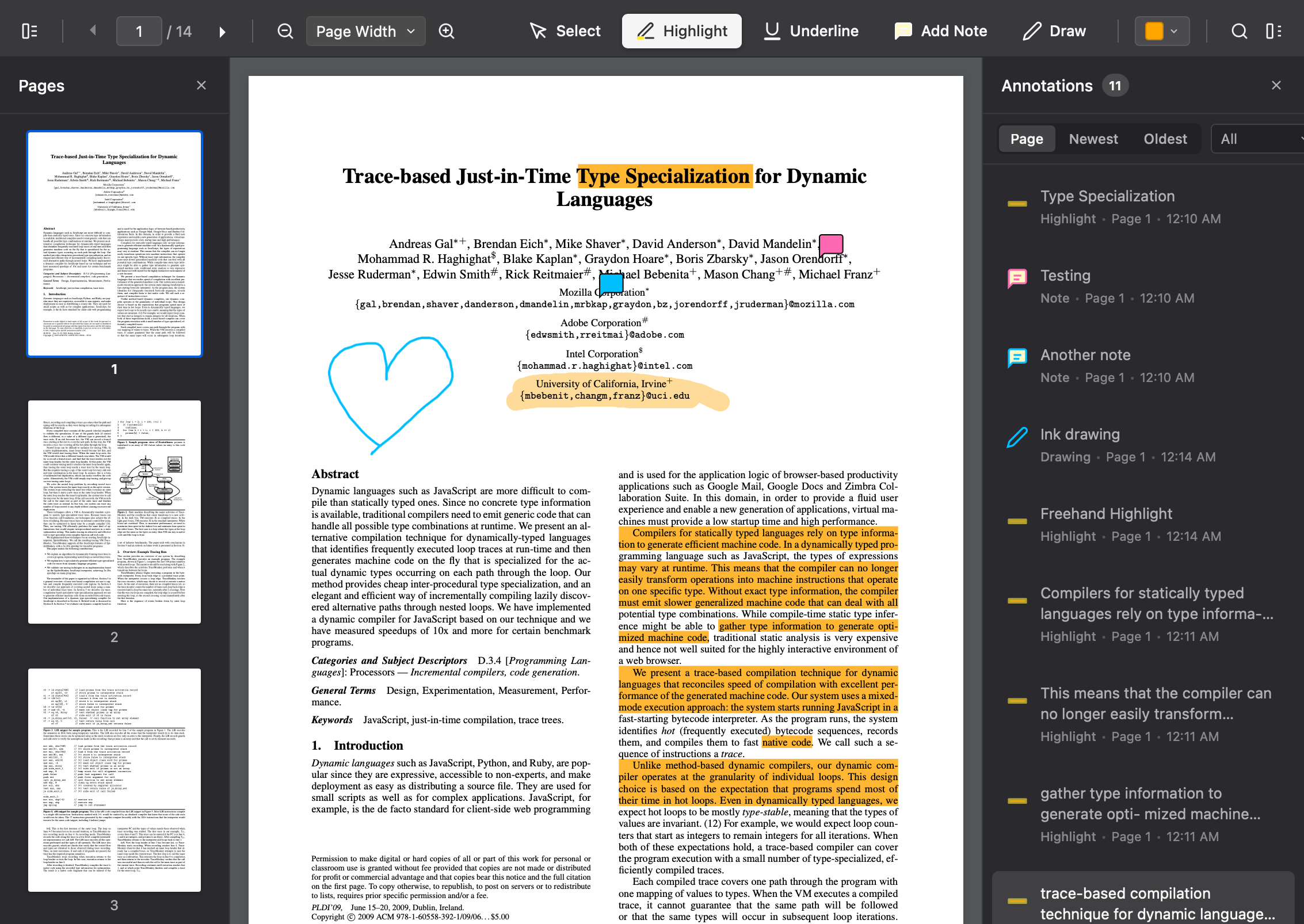
- PDF Rendering - Powered by Mozilla's PDF.js with lazy page loading
- Annotations - Highlights, underlines, sticky notes, and freehand drawing
- Detail Panel - Anchored panel for viewing and editing annotation details (opt-in)
- Links - Hyperlinks in the PDF are clickable: web and email links open in a new tab, links to other pages scroll the viewer
- Search - Find text within the document with keyboard shortcuts
- Thumbnails - Page thumbnail sidebar for quick navigation
- Zoom Controls - Fit to page, fit to width, or custom zoom levels
- Watermarks - User-specific watermarks for document security
- Download - Export PDFs with annotations embedded
- Password-Protected PDFs - Prompts for the password and opens the document read-only
- Mobile Support - Touch gestures, responsive toolbar, pinch-to-zoom
- Accessibility - Screen reader support, keyboard navigation, high contrast mode
npm install stimulus-pdf-viewer @hotwired/stimulus @rails/request.js pdfjs-dist pdf-libOr with yarn:
yarn add stimulus-pdf-viewer @hotwired/stimulus @rails/request.js pdfjs-dist pdf-libOption 1: Download vendored files (Recommended)
Download the packages to your vendor directory:
bin/importmap pin stimulus-pdf-viewer pdfjs-dist pdf-lib --downloadThen download the PDF.js worker file separately:
curl -o vendor/javascript/pdfjs-dist--pdf.worker.js \
  "https://cdn.jsdelivr.net/npm/pdfjs-dist@4.9.155/build/pdf.worker.mjs"
Add the worker to your config/importmap.rb:
pin "pdfjs-dist/build/pdf.worker.mjs", to: "pdfjs-dist--pdf.worker.js"Option 2: Use CDN URLs
Add the following to your config/importmap.rb:
pin "stimulus-pdf-viewer", to: "https://ga.jspm.io/npm:stimulus-pdf-viewer@1.0.0/dist/stimulus-pdf-viewer.esm.js"
pin "pdfjs-dist", to: "https://ga.jspm.io/npm:pdfjs-dist@4.9.155/build/pdf.mjs"
pin "pdfjs-dist/build/pdf.worker.mjs", to: "https://ga.jspm.io/npm:pdfjs-dist@4.9.155/build/pdf.worker.mjs"
pin "pdf-lib", to: "https://ga.jspm.io/npm:pdf-lib@1.17.1/dist/pdf-lib.esm.js"import { Application } from "@hotwired/stimulus"
import { PdfViewerController, PdfDownloadController } from "stimulus-pdf-viewer"
const application = Application.start()
application.register("pdf-viewer", PdfViewerController)
application.register("pdf-download", PdfDownloadController)// In your application.scss
@import "stimulus-pdf-viewer/styles/pdf-viewer";Or copy styles/pdf-viewer.scss to your stylesheets directory.
Copy the cursor SVG files from assets/cursors/ to your asset pipeline (e.g., app/assets/images/pdf_viewer/).
Add a meta tag to configure the PDF.js worker path:
<meta name="pdf-worker-src" content="<%= asset_path('pdfjs-dist--pdf.worker.js') %>"><div data-controller="pdf-viewer"
data-pdf-viewer-document-url-value="<%= url_for(@document.file) %>"
data-pdf-viewer-document-name-value="<%= @document.name %>"
data-pdf-viewer-annotations-url-value="<%= document_annotations_path(@document) %>"
data-pdf-viewer-user-name-value="<%= current_user.name %>"
class="pdf-viewer-container">
<!-- Toolbar -->
<div class="pdf-toolbar">
<!-- See examples/rails/_toolbar.html.erb for full toolbar markup -->
</div>
<!-- Viewer body -->
<div class="pdf-viewer-body">
<div class="pdf-pages-container" data-pdf-viewer-target="container"></div>
</div>
<!-- Loading overlay -->
<div class="pdf-loading-overlay" data-pdf-viewer-target="loadingOverlay">
<div class="pdf-loading-spinner"></div>
<div class="pdf-loading-text">Loading document...</div>
</div>
</div>The PdfViewerController accepts the following Stimulus values:
| Value | Type | Description |
|---|---|---|
documentUrl |
String | URL to the PDF file |
documentName |
String | Display name for downloads |
annotationsUrl |
String | REST API endpoint for annotations |
trackingUrl |
String | (Optional) Endpoint for time tracking |
userName |
String | User name for watermarks |
organizationName |
String | Organization name for watermarks |
initialPage |
Number | Page to open on load (default: 1) |
initialDestination |
String | Named destination in the PDF to open at. Falls back to initialPage if the document doesn't define it. See Linking to a spot in a PDF |
initialAnnotation |
String | Annotation ID to highlight on load |
detailPanel |
Boolean | Enable the anchored detail panel for annotations (default: false) |
To link from elsewhere in your app to a particular section of a document, use a named destination rather than a page number. Named destinations are anchors stored in the PDF itself. Word, InDesign and LaTeX write them for headings and bookmarks, and PDF libraries such as pdf-lib can add them when you generate a document. A name stays attached to its section when the document is regenerated, while page numbers shift whenever content before them changes.
Pass the name to the viewer from your server, for example from a query parameter:
<div data-controller="pdf-viewer"
     data-pdf-viewer-document-url-value="<%= url_for(@document.file) %>"
     data-pdf-viewer-initial-destination-value="<%= params[:dest] %>"
     data-pdf-viewer-initial-page-value="<%= params[:page] %>">
If the document has no destination by that name (for example a stale link, or
an older copy without the anchor), the viewer opens at initialPage instead,
and otherwise at page 1.
Once the viewer is loaded, pdfViewer.goToDestination(name) scrolls to a
destination. It resolves to false if the document doesn't define it.
The viewer expects a REST API at annotationsUrl with these endpoints:
| Method | Path | Description |
|---|---|---|
| GET | {annotationsUrl}.json |
List all annotations |
| POST | {annotationsUrl} |
Create annotation |
| PATCH | {annotationsUrl}/{id} |
Update annotation |
| DELETE | {annotationsUrl}/{id} |
Delete annotation |
| PATCH | {annotationsUrl}/{id}/restore |
Restore deleted annotation |
{
  "id": "uuid",
  "page": 1,
  "annotation_type": "highlight|underline|note|ink",
  "color": "#FFEB3B",
  "opacity": 0.4,
  "quads": [{"p1": {"x": 100, "y": 200}, "p2": {...}, "p3": {...}, "p4": {...}}],
  "rect": [100, 200, 124, 224],
  "contents": "Note text content",
  "ink_strokes": [{"points": [{"x": 100, "y": 200}]}],
  "thickness": 2
}The viewer dispatches these custom events on the container element:
| Event | Description |
|---|---|
pdf-viewer:ready |
Document loaded and ready (detail.readOnly is true for encrypted documents) |
pdf-viewer:page-changed |
User navigated to a different page |
pdf-viewer:annotations-loaded |
Annotations fetched and rendered after document load |
pdf-viewer:annotation-created |
New annotation created |
pdf-viewer:annotation-updated |
Annotation modified |
pdf-viewer:annotation-deleted |
Annotation deleted |
pdf-viewer:annotation-selected |
User selected an annotation |
pdf-viewer:annotation-deselected |
Annotation deselected |
pdf-viewer:detail-panel-opened |
Detail panel opened for an annotation |
pdf-viewer:detail-panel-closed |
Detail panel closed |
pdf-viewer:scale-changed |
Zoom level changed |
pdf-viewer:link-clicked |
A link inside the PDF was clicked. detail is { kind: "external", url } or { kind: "internal", pageNumber }. Cancelable: call preventDefault() to handle the link yourself (e.g. in a native app's web view), and the viewer will neither open the URL nor scroll |
pdf-viewer:mode-changed |
Tool mode switched |
pdf-viewer:error |
Error occurred |
pdf-viewer:user-error |
User-facing error occurred |
pdf-sidebar:annotation-selected |
Annotation selected in sidebar |
pdf-sidebar:annotation-deselected |
Annotation deselected in sidebar |
pdf-sidebar:annotation-sidebar-opened |
Annotation sidebar opened |
pdf-sidebar:annotation-sidebar-closed |
Annotation sidebar closed |
Pass an onError callback when using the PdfViewer class directly:
const viewer = new PdfViewer(container, {
  documentUrl: "/path/to/document.pdf",
  onError: (error) => {
    // Send to your error tracking service
    Sentry.captureException(error)
  }
})When a document requires a password, the viewer shows a prompt (with retry on
incorrect entry) and opens the document once unlocked. Cancelling the prompt
surfaces the standard load-failure state and dispatches pdf-viewer:load-failed.
Encrypted documents open in read-only mode: annotation tools are disabled,
existing annotations are not loaded, and the download button delivers the
original file instead of an annotated copy (pdf-lib cannot open encrypted PDFs
to embed annotations). Read-only mode is signalled by detail.readOnly on the
pdf-viewer:ready event, a pdf-viewer-read-only class on the container, and
the readOnly property on the PdfViewer instance.
For the easiest Rails setup, use the stimulus-pdf-viewer-rails gem which handles asset configuration automatically.
For manual integration, see examples/rails/ for complete Rails integration examples including:
- View partials for the viewer and toolbar
- Annotations controller
- Annotation model with validations
- Chrome/Edge 88+
- Firefox 78+
- Safari 14+
- Mobile Safari (iOS 14+)
- Chrome for Android
This project is dual-licensed:
- MIT License (LICENSE-MIT) - for original code
- Apache License 2.0 (LICENSE-APACHE) - for code derived from PDF.js
See the NOTICE file for attribution details.
Built with:
- PDF.js - PDF rendering engine (Apache 2.0). Portions of this library's rendering queue, text layer selection, and search functionality are derived from PDF.js patterns.
- pdf-lib - PDF manipulation for downloads
- Stimulus - JavaScript framework
- @rails/request.js - HTTP requests with Turbo Stream support