



⚠️ Unofficial API. Somtoday never published this API, and does not support it being used this way. The integration works today, but Topicus can change or block it without warning — a version that works this morning can break this afternoon with nothing changed on your side. Versions stay in the0.x.xrange while that risk is live; see CHANGELOG.md.
Brings a student's Somtoday timetable, homework and tests into Home Assistant.
Somtoday itself stays read-only. Optional personal appointments are stored only
in Home Assistant's local .storage; nothing is written back to Somtoday.
- A calendar with the full timetable, including dropped and moved lessons.
- The current lesson and the next lesson, with subject, room, teacher and lesson period.
- The next school day — first lesson, last bell, and the whole day's lesson list as an attribute. This is what makes an "evening before" notification possible.
- Today — the complete current school day, which stays on today after the last bell instead of rolling forward.
- Open homework and the next test.
- A local planner sensor per student for appointments around the school day. Administrators can edit it; additional users can be selected in the integration options. Everyone else has read-only access.
- A last update diagnostic sensor, so a silently stalled integration is visible instead of just looking like a quiet week.
One Home Assistant device per student, so a parent account with two children gets two clean sets of entities.
The integration has its own Lovelace card: Somtoday Card — a week timetable, today and tomorrow, homework and tests, with lessons, homework and tests opening in a dialog. Add it to a dashboard and it fills itself in for every child on the account; there is nothing to type.
With more than one child it gets a row of buttons per child, and can show every child's day side by side.
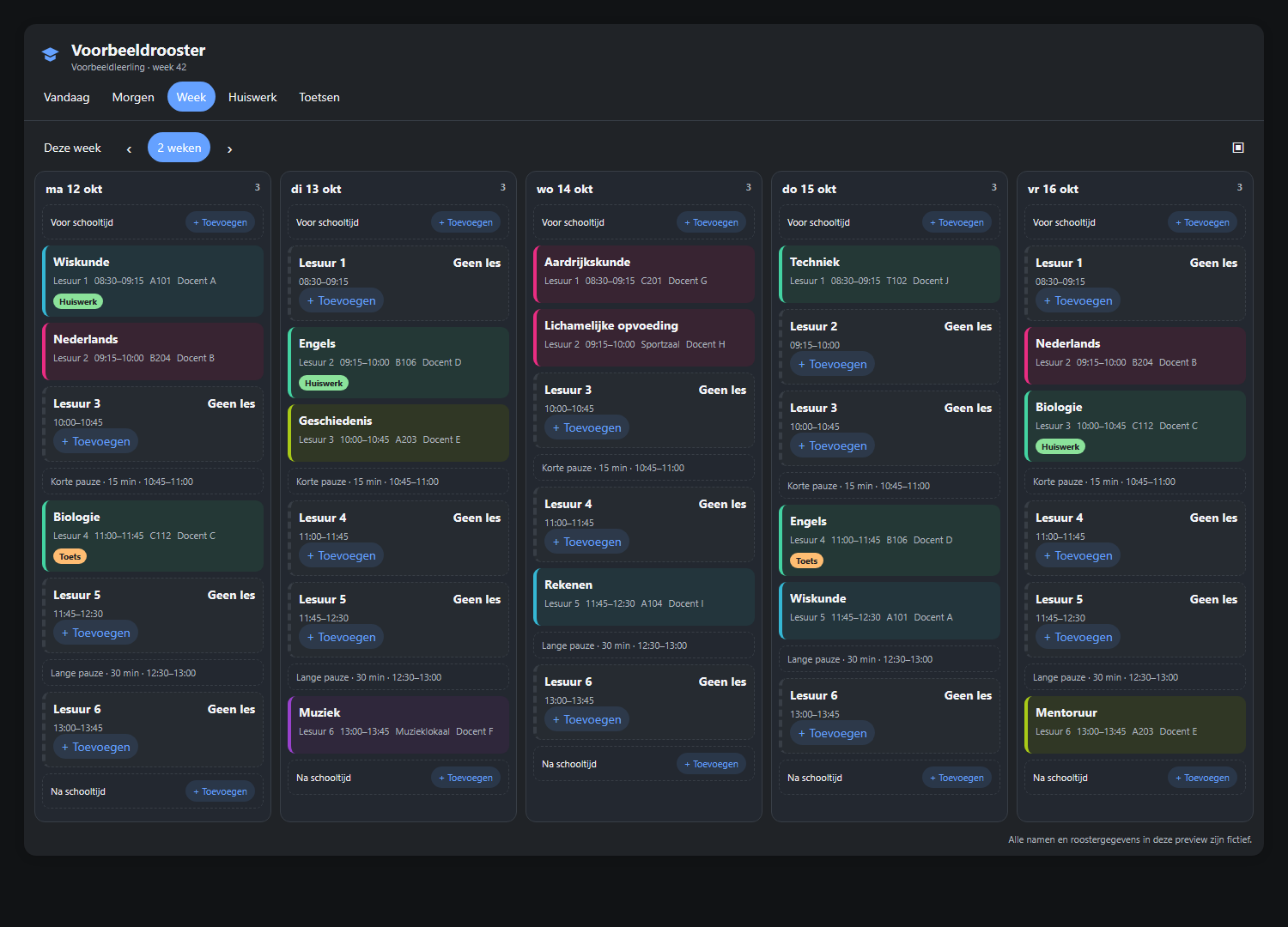
Install it from HACS as a Dashboard custom repository:
https://github.com/jonisnet/ha-somtoday-card. All names and lessons in the
screenshot are fictional.
- Home Assistant 2024.11.0 or newer.
- A Somtoday student or parent login. The iCalendar token is not enough — see Alternatives below.
- A browser on the machine you set this up from. The login happens there, not in Home Assistant.
- Go to HACS → Integrations.
- Open the ⋮ menu, top right, and choose Custom repositories.
- Add
https://github.com/jonisnet/ha-somtoday, category Integration. - Click Add, then install Somtoday.
- Restart Home Assistant.
- Copy
custom_components/somtodayinto your Home Assistant config'scustom_componentsdirectory. - Restart Home Assistant.
For Chrome and Edge, download the optional
Somtoday Login Helper 0.1.4 (ZIP).
Extract it and double-click INSTALLEREN-WINDOWS.cmd; it opens the browser
page and folder you need. The helper detects only this exact Somtoday callback
and gives you a Kopiëren en wissen button. It uses Manifest V3 and does not
change or couple itself to the Home Assistant integration. The
full guide covers manual installation, usage,
permissions and security. The DevTools method below remains available without
an extension.
Go to Settings → Devices & services → Add integration and pick Somtoday.
The form shows a link and asks for one thing back:
- Open the login link in a new browser tab. This is Somtoday's own login page: pick the school, then sign in as usual.
- Somtoday redirects to an address starting with
somtoday://. No browser can open that — and that address carries the login code. - Paste it into Home Assistant.
That is Chrome, and your login did work. Chrome silently discards redirects to schemes it has no handler for: no error page, no address-bar change, nothing. Older browsers showed an "unknown protocol" error; Chrome does not. Pressing sign-in again just restarts the whole login, which is why it asks for your password a second time.
The code is still there, in the redirect Chrome threw away. To read it out:
- Before signing in, press F12 to open DevTools.
- Go to the Network tab and tick Preserve log.
- Sign in. Nothing visible happens — that is the point.
- Click anywhere in the request list and press Ctrl+F,
then search for
somtoday://. DevTools searches inside headers too, so this lands directly on the one response that carries the code. - Open Headers → Response Headers on that request and copy the
location:value. It starts withsomtoday://and containscode=. - Paste it into Home Assistant. Pasting the whole
location:line is fine — the field looks for the code anywhere in what you paste, so surrounding headers or quotes do not matter.
Search rather than scroll. Chrome appends new requests to the bottom of the list, so the request you need is the last one. The first entry is the original authorization request, and its
locationpoints back at the login page — copying that one is the easiest mistake to make here.
This is not a workaround for a bug on our side. Somtoday's OAuth client only
accepts its own somtoday:// redirect address — every alternative is rejected
with HTTP 400 — so there is no redirect a browser could display instead.
It is single-use and expires within a few minutes. If Somtoday rejects it, the form mints a new link and you do have to sign in again. If the paste was simply the wrong text, the link you already opened stays valid — no second login needed.
To deliberately replace a stored Somtoday session, open the integration's menu and choose Reconfigure. This runs the same login flow without deleting the integration, its entities or its local planner data. A rejected refresh token also opens this flow automatically.
Access tokens expire after about one hour. The integration refreshes them in the background and immediately stores Somtoday's rotated refresh token, so a normal expiry does not require another manual login.
Somtoday's login is designed for its own mobile app, which registers the
somtoday:// scheme on the phone. Home Assistant is not that app and cannot
receive the redirect, so the round trip goes through your browser instead.
The upside is real: because you sign in on Somtoday's actual login page, this works for every school — including the ones behind Microsoft or Google SSO, and ones with two-factor authentication — and Home Assistant never sees your password. It only ever holds a refresh token, which you can revoke by changing your Somtoday password.
| Method | Supported | Why |
|---|---|---|
| Authorization code + PKCE (the flow above) | ✅ | Works for every school, no password in Home Assistant |
| School SSO (Microsoft, Google, school portal) | ✅ | You sign in on Somtoday's page, so SSO is handled there |
| Two-factor authentication | ✅ | Same reason |
| Automatic token refresh | ✅ | Refresh tokens rotate and are re-persisted each poll |
| Re-authentication when the session dies | ✅ | Home Assistant prompts with the same paste flow |
| Username + password entered in Home Assistant | ❌ | Somtoday disabled the password grant: it answers Password grant is disabled for insecure clients. The remaining option is scraping Somtoday's login form, which breaks on every UI change and fails outright on SSO schools. Deliberately not implemented. |
Settings → Devices & services → Somtoday → Configure:
- Refresh interval — 15 minutes to 4 hours, default 30. A timetable rarely changes faster than that.
- Days of schedule to fetch — 1 to 8 weeks, default 8. The integration always keeps eight weeks available for compatible dashboard cards. This is what the sensors and the cached calendar cover; the calendar can still show any period, it just fetches those on demand.
Per student. Entity ids follow your Home Assistant language — the Dutch names
are shown here, an English instance reads next_lesson, next_school_day,
open_homework, next_test, current_lesson, last_update.
| Entity | State | Key attributes |
|---|---|---|
calendar.somtoday_<naam>_rooster |
On during a lesson | Standard calendar attributes |
sensor.somtoday_<naam>_huidige_les |
Subject, or unknown between lessons | teacher, location, start, end, period_start, status, cancelled |
sensor.somtoday_<naam>_volgende_les |
Start time (timestamp) | Same as above |
sensor.somtoday_<naam>_eerstvolgende_schooldag |
First lesson's start (timestamp) | date, lesson_count, cancelled_count, last_lesson_end, lessons |
sensor.somtoday_<naam>_vandaag |
Today's first lesson (timestamp) | date, lesson_count, cancelled_count, first_lesson, last_lesson_end, lessons |
sensor.somtoday_<naam>_openstaand_huiswerk |
Count | homework (list of subject, topic, description, due, type) |
sensor.somtoday_<naam>_volgende_toets |
Due moment (timestamp) | subject, topic, description, type |
sensor.somtoday_<naam>_deze_week |
Lessons in the active week | week_number, deviation_count, days (per day: lessons with deviates / deviation, plus missing) |
sensor.somtoday_<naam>_basisrooster |
Recurring lessons in a normal week (disabled by default) | weeks_observed, days |
sensor.somtoday_<naam>_laatste_update |
Last successful poll (timestamp) | — |
Notes on behaviour that is easy to misread:
- Cancelled lessons are skipped by the current-lesson and next-lesson
sensors — reporting a dropped lesson as "your next lesson" would be worse
than saying nothing. They stay visible on the calendar with a
Vervallen:prefix, and in thelessonsattribute withcancelled: true. - The next school day rolls over after the last bell, not at midnight. So during the day it describes today, and from the moment the last lesson ends it describes the next day with lessons. That is what makes the evening-before automation work.
- Today never rolls forward. It continues to expose the complete current date, including ended and cancelled lessons, until midnight.
- Undated homework is kept, sorted last. Somtoday allows study items with no due date and hiding them would lose real work.
- An unrecognised lesson status is reported as
unknown, never guessed. If you see that, the raw Somtoday value is in theraw_statusattribute and in diagnostics — please open an issue so it can be mapped.
Somtoday publishes no base timetable — only a list of concrete appointments. So the normal week is derived: for each weekday and lesson period, whichever lesson turns up most often across the weeks currently held. Cancelled lessons are excluded from that vote, since a dropped lesson is precisely the deviation this exists to measure.
That makes the active-week sensor able to mark where this week differs: a
lesson cancelled, in a different_room, with a different_teacher, at a
different_time, an extra lesson that is not normally there — and, per day, a
missing list of normal-week lessons that have no appointment this week at all.
Without that last one a quietly removed lesson would simply be absent, which is
the one change an active-week view could otherwise hide completely.
How much to trust it depends on how many weeks were fetched. A slot must
appear in at least two distinct weeks before it counts as normal, and
weeks_observed is published so you can see what the derivation had to work
with. Four weeks is the default for exactly this reason — at two weeks a
recurring slot is barely distinguishable from a coincidence, at four it is a
pattern. Lower it only if you do not use the normal-week view. That is also why the base-week sensor is disabled by
default — it should be an explicit choice, not something that quietly presents
a one-week guess as the timetable.
A blueprint does this for you — pick the phones from a list and it works out the rest. No YAML, no service names to type.

You only have to answer one question: which phones get the message. Everything
else has a working default. Step-by-step instructions are in
examples/README.md, and the plain YAML version lives in
examples/automations/ if you would rather edit the
wording yourself.
Two things that look like a broken setup but are not: nothing arrives until Somtoday actually changes something, and the first check after a Home Assistant restart stays quiet on purpose. To see it work straight away, fire the event by hand — see Testing a notification.
Somtoday has no push, so a change is only visible by comparing one poll against
the last. The integration does that comparison and fires
somtoday_schedule_changed on the event bus — one event per student per
poll, with every change batched together, so a whole day being dropped is one
notification rather than seven.
device_id: <the student's device, so a parent account can route per child>
student_id: 1000001
change_count: 2
cancelled_count: 1
changes:
  - type: cancelled          # or reinstated / moved / room_changed /
    subject: wiskunde        # teacher_changed / added / removed
    teacher: abc
    location: "204"
    start: "2026-09-02T13:45:00+02:00"
    end: "2026-09-02T14:30:00+02:00"
    period_start: 7
    cancelled: true
    previous:                # the same fields, as they were before
      teacher: abc
      location: "204"
      start: "2026-09-02T13:45:00+02:00"
      end: "2026-09-02T14:30:00+02:00"
      period_start: 7
      cancelled: false
Three rules keep this from crying wolf:
- Nothing fires on the first poll after a restart. The previous timetable is held in memory only, so every restart would otherwise look like the whole schedule had just appeared.
- Lessons that have already started are ignored. They cannot usefully change, and the fetch window drops old days as it slides forward.
- The newly revealed far edge is ignored. The window moves forward about a day per poll; without this, every poll would announce a fresh day's worth of "added" lessons.
previous is absent for added (there was no earlier version) and for
removed (there is no later one — the change's own fields are the old
lesson).
The Run button on an automation does not work for this: it executes the
actions with no trigger, so trigger.event.data does not exist and the
template fails with UndefinedError: 'trigger' is undefined. That says nothing
about whether the automation works.
Fire the event instead — Developer tools → Events, event type
somtoday_schedule_changed, and this as the event data:
device_id: null
student_id: 1000001
change_count: 2
cancelled_count: 1
changes:
  - type: cancelled
    subject: wiskunde
    teacher: abc
    location: "204"
    start: "2026-09-02T13:45:00+02:00"
    end: "2026-09-02T14:30:00+02:00"
    period_start: 7
    cancelled: true
    previous:
      teacher: abc
      location: "204"
      start: "2026-09-02T13:45:00+02:00"
      end: "2026-09-02T14:30:00+02:00"
      period_start: 7
      cancelled: false
  - type: room_changed
    subject: Engelse taal
    teacher: def
    location: "118"
    start: "2026-09-02T11:45:00+02:00"
    end: "2026-09-02T12:30:00+02:00"
    period_start: 5
    cancelled: false
    previous:
      teacher: def
      location: "203"
      start: "2026-09-02T11:45:00+02:00"
      end: "2026-09-02T12:30:00+02:00"
      period_start: 5
      cancelled: false
That drives the real automation end to end, notify services included.
If the notification never arrives, check the service names first. Under
Developer tools → Actions, type notify. and copy what is actually listed —
mobile devices are usually notify.mobile_app_<device>. Use the full name,
including the notify. prefix: the example passes it through unchanged.
Ready-made automations live in examples/ — an evening-before
summary, a reminder before the first lesson, a cancelled-lesson notification
and a test heads-up. The dashboard YAML there shows which data each entity
offers; for an actual dashboard, use the Somtoday Card
instead — Home Assistant's markdown card strips the styling those examples
would need.
- Grades, absences and messages are not exposed. They are technically reachable, but they are the most sensitive data in the account and were left out of this version on purpose.
- Homework completeness depends on the school. Somtoday spreads study-guide items over three endpoints (per lesson, per day, per week); all three are fetched, but a school that keeps its homework somewhere else entirely will show less than the app does.
- Cancellation detection is as fast as the poll interval. A lesson dropped five minutes ago shows up at the next refresh, not instantly.
- No push. Somtoday has no webhook for this; polling is the only option.
- The lesson lists in attributes are capped at 30 items so they stay under Home Assistant's state-attribute size limit.
- No brand icon yet, so the integration shows a generic placeholder in the integrations list.
Somtoday officially supports an iCalendar token (Somtoday → Instellingen → Agenda). If all you want is the timetable in a calendar, that is the supported route — and Home Assistant's built-in Remote Calendar integration reads any ICS URL, so you do not need this integration for it.
It is not a replacement, though: Somtoday states that the feed carries schedule appointments only — no homework and no tests — and it is not available to parent accounts. That gap is why this integration talks to the REST API instead.
- Your password never reaches Home Assistant. You type it on Somtoday's own login page.
- Only the refresh token is stored, in Home Assistant's own encrypted config entry storage. Access tokens live an hour and are re-minted on every restart, so none is ever written to disk.
- Nothing secret is logged. No token, no login code, no authorization URL is written to the log at any level.
- Diagnostics are structural, not redacted payloads. The diagnostics file contains counts, statuses, timings and field-coverage numbers — no name, class, teacher, room, homework topic or token. That is deliberate: diagnostics get attached to public issues, and this account belongs to a child.
- Revoking access: change the Somtoday password. The stored refresh token stops working and Home Assistant will ask you to sign in again.
Signing in appears to do nothing at all Chrome discarded the redirect. Your login worked. See If nothing seems to happen after signing in.
"That is the address of the Somtoday login page"
The address bar was copied before the login finished. That URL carries an
auth= parameter and no code — the code only exists after you have signed
in. The link in the form is still valid, so you do not have to start over.
"No login code found in that address"
Something without a code= in it. The address you need starts with
somtoday://, not with https://. Copy it whole, from somtoday:// to the
end. If the browser cleared the address bar after the failed protocol handler,
open the same link again — it is still valid.
"Somtoday rejected the login code" The code expired, or it had already been used. This is the one case where the form mints a new link: use that one, not the tab you still have open.
"Signed in successfully, but this account has no students linked to it" The login worked but Somtoday returned no students. This usually means a staff or otherwise non-student account.
Entities show "unavailable" Somtoday could not be reached on the last poll. Check the last update sensor for when it last succeeded. Home Assistant retries automatically; a genuinely dead session raises a re-authentication prompt instead.
Home Assistant keeps asking me to sign in again That only happens when Somtoday rejects the stored refresh token outright. Changing the Somtoday password does this, and so does signing in on many devices if Somtoday decides to invalidate older sessions.
Something is missing or wrong in the schedule Enable debug logging (Settings → Devices & services → Somtoday → ⋮ → Enable debug logging), download diagnostics, and open an issue. The diagnostics file is safe to attach — it carries no personal data by design.
Settings → Devices & services → Somtoday → ⋮ → Delete. That removes the config entry, its devices and its entities, including the stored refresh token. If you want to be thorough, change your Somtoday password afterwards to invalidate the token on Somtoday's side too.
Somtoday publishes no API for this. Everything here is built on community documentation and on the endpoints Somtoday's own app uses. Two things that documentation got wrong were already found while building this: the password grant is disabled, and the school-list endpoint it points at was removed in February 2025. Expect more of that. If Topicus changes the API, this integration breaks until it is updated — and it may not be fixable at all if they decide to lock the app client down.
pip install -r requirements.test.txt
pytest
ruff check .
The test suite needs a POSIX environment: Home Assistant imports fcntl and
resource unconditionally, so the harness does not run natively on Windows.
CI runs on Linux.