This project demonstrates how to configure Varnish Cache to handle API requests efficiently, including authentication and caching strategies for secure and non-secure endpoints.
- Overview
- Project Structure
- Prerequisites
- Setup and Running
- Testing the Setup
- Viewing Logs
- Configuration Details
- References
This project includes:
- NGINX Backend: Acts as the API server, serving static files and handling API requests.
- Varnish Cache: Acts as a reverse proxy and caching layer, handling authentication and caching responses based on defined rules.
Varnish is configured to:
- Authenticate requests to certain endpoints.
- Cache both secure and non-secure API responses based on URL rules.
- Use custom headers to indicate cache status.
.
├── README.md
├── start_nginx.sh
├── start_cache.sh
├── log.sh
├── nginx.conf
├── default.vcl
└── html/
    ├── authenticate.html
    ├── index.html
    ├── secure.html
    ├── secure_cached.html
    ├── unsecure.html
    └── unsecure_cached.html
- Docker installed on your system.
- Basic knowledge of command-line operations.
Run the following script to start the NGINX backend:
./start_nginx.shThis script:
- Stops and removes any existing NGINX container.
- Starts a new NGINX container named
nginx-server. - Maps port 9080 on the host to port 80 in the container.
- Mounts
html/andnginx.confinto the container.
Run the following script to start Varnish:
./start_cache.shThis script:
- Stops and removes any existing Varnish container.
- Starts a new Varnish container named
varnish-appcache. - Maps port 9090 on the host to port 80 in the container.
- Mounts
default.vclinto the container.
After starting both NGINX and Varnish, test the caching behavior.
curl -i http://localhost:9090/unsecure.htmlExpected Output:
- X-Cache: uncached
- Static content from
unsecure.html.
curl -i http://localhost:9090/unsecure_cached.htmlExpected Output:
- X-Cache: cached (on subsequent requests)
- Static content from
unsecure_cached.html.
curl -i -H "x-client-certificate: token" http://localhost:9090/secure.htmlExpected Output:
- X-Cache: uncached
- Static content from
secure.html.
curl -i -H "x-client-certificate: token" http://localhost:9090/secure_cached.htmlExpected Output:
- X-Cache: cached (on subsequent requests)
- Static content from
secure_cached.html.
Use the following script to view Varnish logs:
./log.shThis displays Varnish log output filtered for std.log entries from default.vcl.
File: nginx.conf
- Serves static content from the
html/directory. - Listens on port 80 within the container.
File: default.vcl
-
Backend Configuration:
- Points to the NGINX server running on
host.docker.internalport9080.
- Points to the NGINX server running on
-
Request Handling (
vcl_recv):- Logs incoming requests.
- Differentiates between secure and non-secure requests.
- Handles authentication for secure requests and passes them to the backend if required.
- Determines caching strategy (pass or hash) based on URL patterns.
-
Response Handling (
vcl_backend_response):- Caches responses for a defined duration (e.g., 20 seconds) unless they are manifest files.
-
Delivery Handling (
vcl_deliver):- Adds the
X-Cacheheader to indicate caching status. - Restarts requests with proper authentication if needed.
- Adds the
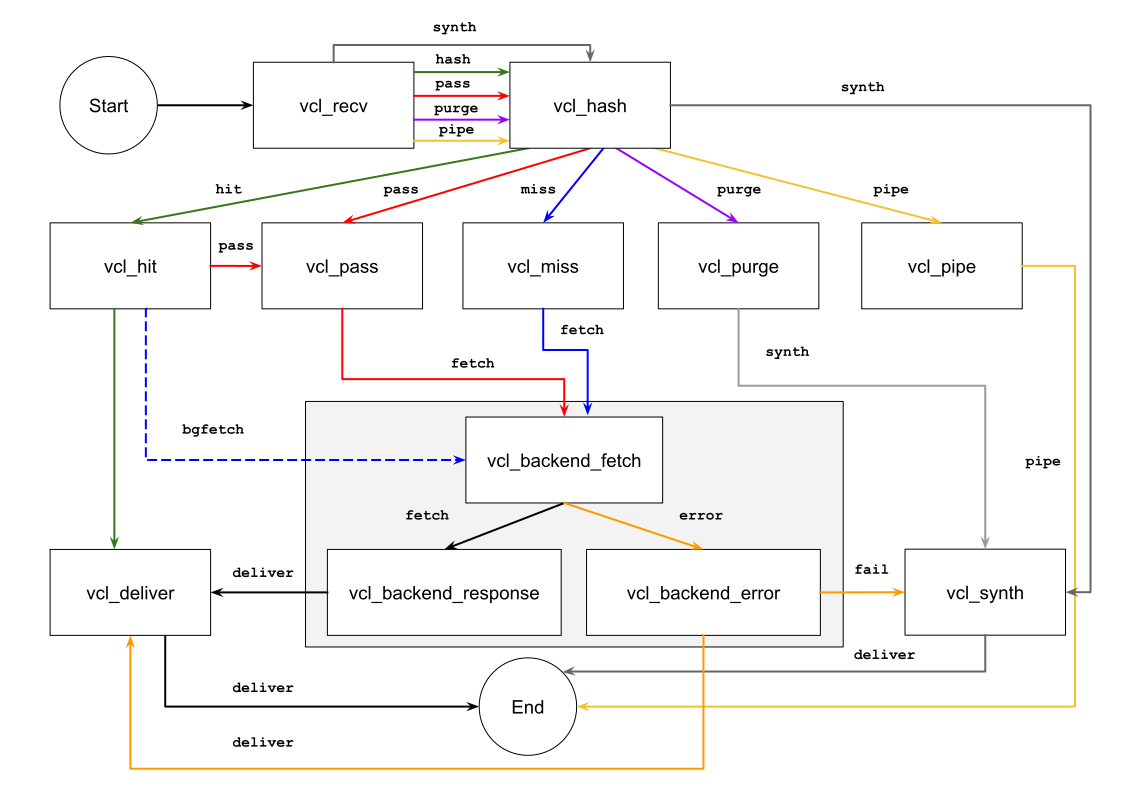
Read more on the flow between these methods in this tutorial on vcl: