


Integrating PepGM and Unipept for probability-based effect inference of metaproteomic samples
Table of Contents
Introducing the Peptonizer2000 - a tool that combines the capabilities of Unipept and PepGM to analyze metaproteomic mass spectrometry-based samples. Originally designed for taxonomic inference of viral mass spectrometry-based samples, we've extended PepGM's functionality to analyze metaproteomic samples by retrieving taxonomic information from the Unipept database. The pipeline can also be used for other peptide-effect relations, such as functional analysis.
PepGM is a probabilistic graphical model developed by Tanja Holstein et al. that uses belief propagation to infer the taxonomic origin of peptides and taxa in viral samples. You can learn more about PepGM at GitHub page.
Unipept, on the other hand, is a web-based metaproteomics analysis tool that provides taxonomic information for identified peptides. To make it work seamlessly with PepGM, we've extended Unipept with new functionalities that restrict the taxa queried and provide all potential taxonomic origins of the peptides queried. Check out more information about Unipept here.
With the Peptonizer2000, you can look forward to a comprehensive and streamlined workflow that simplifies the process of identifying peptides and their taxonomic origins in metaproteomic samples.
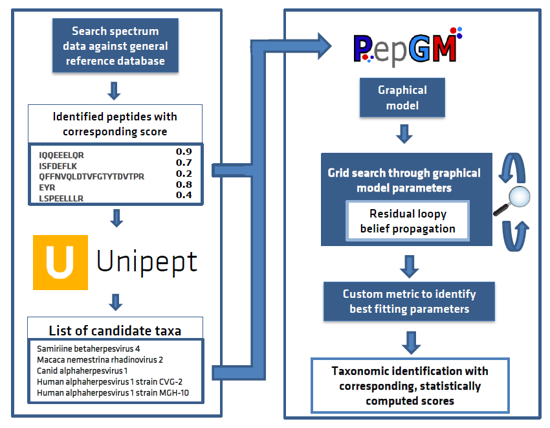
The Peptonizer2000 workflow is comprised of the following steps:
- Query all identified peptides, provided by the user in a .tsv file, in the Unipept API, and restrict the taxonomic range queried based on any prior knowledge of the sample.
- Assemble the peptide-effect associations provided by Unipept into a bipartite graph, where peptides and effects are represented by different nodes, and an edge is drawn between a peptide and a effect if they are related.
- Transform the bipartite graph into a factor graph using convolution trees and conditional probability table factors (CPD).
- Run the belief propagation algorithm multiple times with different sets of CPD parameters until convergence, to obtain posterior probabilities of candidate effects.
- Use an empirically deduced metric to determine the ideal graph parameter set.
- Output the top scoring effects as a results barchart. The results are also available as comma-separated files for further downstream analysis or visualizations.
- A .tsv file of your peptides output from any protoemic peptide search method. The first column should be the peptide, the second column it's score attributed by the search engine. An example is provided in test files.
- A config file with your parameters for the peptonizer2000. A more detailed description of the configuration file can be found below. Additionally, an exemplary config file is provided in this repository.
The core algorithm is implemented in Rust in the peptonizer_rust folder. Wheels are created for all major platforms so users can use the package on supported systems.
In order to run the Peptonizer2000 on your own system, you should install Conda, Mamba and all of its dependencies. Follow the installation instructions step-by-step for an explanation of what you should do.
- Make sure that Conda and Mamba are installed. If these are not yet present on your system, you can follow the instructions on their README.
- Go to the "workflow" directory by executing
cd snakemake/workflowfrom the terminal. - Run
conda env create -f env.yml(make sure to run this command from the workflow directory) in order to install all dependencies and create a new conda environment (which is named "peptonizer" by default). - Run
mamba install -c conda-forge -c bioconda -n peptonizer snakemaketo install snakemake which is required to run the whole workflow from start-to-finish. - Run
conda activate peptonizerto switch the current Conda environment to the peptonizer environment you created earlier. - Start the peptonizer with the command
snakemake --use-conda --cores 1. If you have sufficient CPU and memory power available to your system, you can increase the amount of cores in order to speed up the workflow.
If you see the following error while installing dependencies:
ERROR: Could not find a version that satisfies the requirement peptonizer_rust (from versions: none)
ERROR: No matching distribution found for peptonizer_rust
then the workflow could not find a wheel for peptonizer_rust for your platform. To create one manually, expand the instructions below.
Show manual wheel creation instructions
-
Change to the Rust package directory:
cd peptonizer_rust -
Download the rustup installer:
curl -sSf -o rustup-init.sh https://sh.rustup.rs
-
Run the installer with defaults:
sh rustup-init.sh -y
-
Make
cargoavailable in this shell session:source "$HOME/.cargo/env"
-
Update the Rust toolchain to stable:
rustup update
-
Install Linux build tools (Debian/Ubuntu example):
sudo apt-get update
sudo apt-get install -y build-essential
-
Install
maturininto the active Conda environment (run afterconda activate peptonizer):python -m pip install --upgrade pip setuptools wheel python -m pip install maturin
-
Build the wheel for Python 3.12 (adjust
-iif using a different Python):maturin build --release --out dist -i python3.12
The command writes one or more .whl files to peptonizer_rust/dist.
The Peptonizer2000 relies on a configuration file in yaml format to set up the workflow.
An example configuration file is provided in snakemake/config/config.yaml.
Do not change the config file location.
Details
Directory parameters
- data_dir: relative path to output files
- input_file: relative path to input .tsv
- log_dir: relative path to log directory
Analysis specific parameter
- effects_in_graph: number of effects used in the graphical model
- effects_in_plot: number of effects reported in bar plot
- alpha: grid search increments for alpha (list)
- beta: grid search increments for beta (list)
- prior: grid search increments for prior (list)
- regularized: boolean. If True, the probability for the number of parents effects of a peptide is regularized to be inversely proportional to the number of parents
UniPept query parameters
- taxon_rank: NCBI rank at which taxonomic results will be reported
- taxon_query: taxa comprised in the Unipept query. If querying all of Unipept, use 1 (list)
All Peptonizer2000 output files are saved into the data_dir folder (see config parameters) and include the following:
Main results:
- peptonizer_result.json: results of the best-scoring parameter set
- peptonizer_result.png: bar plot of the peptonizer results showing the scores for the #'effects_in_plot' (see config parameters) highest scoring effects
Additional files:
- Intermediate results folders sorted by their prior value for all possible grid search parameter combinations
- effects_weights_dataframe.csv: csv file of all taxids that had at least one peptide map to them and their weight
- pepgm_full_graph_bytes.bin: serialized factor graph used for belief propagation
- sequence_scores_dataframe.csv: dataframe with petides, effects and scores used to create the graph
- best_parameters.csv: file with best parameters
- peptide_taxa.json: response of unipept queries
- effect_cluster_heads_dataframe.csv: additional .csv file resulting from the clustering of effects by peptidome used for rbo
To test the Peptonizer2000 and see if it is set up correctly on your machine, we provide a test file under resources/test_files. This should be dowloaded automatically if you follow the installation instructions above. There are several test files from different metaproteomic samples. These are:
- the samples S03, S05 and S11 of the CAMPI study searched against a sample specific database using X!Tandem and MS2Rescore. The original files are available through PRIDE under PXD023217.
- the sample U1 of uneven communities from a metaproteomic benchmark study by Kleiner searched against a sample specific database. The original files are available through PRIDE under PXD006118
- the sample F07, a fecal sample, of the CAMPI study searched against the integrated gene catalog for the human gut using X!Tandem and MS2Rescore. The original files are available through PRIDE under PXD023217.
To execute a test run of the Peptonizer2000 using the provided files:
- Follow the installation instructions above
- In the config file, make sure to point to the test sample you want to use. By default, this is S03
- Start to peptonize with the command
snakemake --use-conda --cores 1. If you have sufficient CPU and memory power available to your system, you can increase the amount of cores in order to speed up the workflow.
The peptonizer_analysis folder provides three standalone Rust command-line tools that run the full
Peptonizer2000 pipeline (effect weighing, factor graph construction, a belief-propagation grid search, and
best-parameter selection) directly against TSV files, without installing Conda/Snakemake and without a browser.
You supply the peptide-effect relationships yourself, rather than starting from a raw peptide list — protein_inference
and functional_analysis then make no Unipept queries at all, since protein and function IDs are used as-is:
taxonomic_analysis— infers taxonomic origin from peptide-to-taxon relationships (taxon IDs are normalized to species rank before weighing via a Unipept API call, so this tool needs network access)protein_inference— infers the source protein from peptide-to-protein relationships (no Unipept queries)functional_analysis— infers functional annotations from peptide-to-function relationships (no Unipept queries)
cargo build --release -p peptonizer_analysisRun this from the repository root. The compiled binaries are written to target/release/.
Each tool takes three tab-separated files with no header row:
| File | Flag | Columns |
|---|---|---|
| Relationships | --peptide-taxa / --peptide-proteins / --peptide-functions |
peptide, id (an integer taxon ID, or a protein/function ID string such as a GO or EC term) |
| Scores | --peptide-scores |
peptide, score (a float, e.g. from your search engine) |
| Counts | --peptide-counts |
peptide, count (an integer PSM count) |
A peptide can appear on multiple rows of the relationships file to associate it with more than one ID.
./target/release/taxonomic_analysis \
  --peptide-taxa peptide_taxa.tsv \
  --peptide-scores peptide_scores.tsv \
  --peptide-counts peptide_counts.tsv \
  --output taxonomic_analysis_results.tsv

./target/release/protein_inference \
  --peptide-proteins peptide_protein.tsv \
  --peptide-scores peptide_scores.tsv \
  --peptide-counts peptide_counts.tsv \
  --output protein_inference_results.tsv

./target/release/functional_analysis \
  --peptide-functions peptide_functions.tsv \
  --peptide-scores peptide_scores.tsv \
  --peptide-counts peptide_counts.tsv \
  --output functional_analysis_results.tsv
--output is optional and defaults to <tool_name>_results.tsv in the current directory. Run any tool with
--help/-h for a one-line usage reminder. Unlike the Snakemake workflow's config.yaml, the alpha/beta/prior
grid-search ranges are currently fixed per tool rather than user-configurable.
A TSV with a header row and one row per ID, sorted by descending posterior probability, e.g. for
taxonomic_analysis:
taxon_id	probability
2	0.98
816	0.42
(protein_id/function_id for the other two tools; these report the original protein/function ID string
instead of an internal ID.)
Distributed under the Apache 2.0 License. See LICENSE.md for more information.
Tanja Holstein - @HolsteinTanja
Pieter Verschaffelt
For questions or feedback, send an email to unipept@ugent.be.